H
how to use the stove
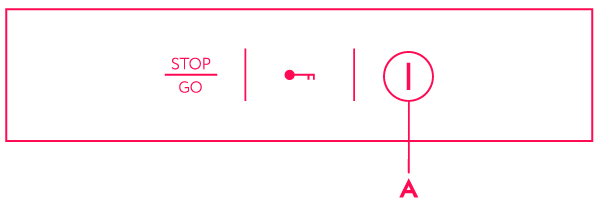
The cooking hob is fitted with electronic sensor keys which are activated, respectively, when the indicated surface of a particular sensor is touched with a finger for at least one second.
Activation of a sensor key is confirmed by a beep.
Do not place any objects on the sensor key surface (this may trigger error reports).
Make sure the sensor key surface is always clean.
Turning on the cooking hob
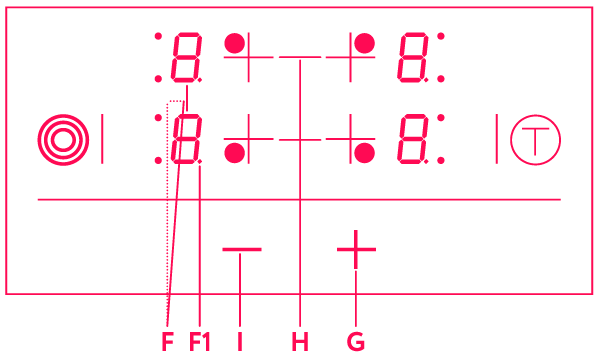
Touch the on/off sensor key (A) and hold it for at least one second. The cooking hob is activated; a “0” is displayed next to all power level displays (F), and a decimal point (F1) is flashing.
Any subsequent setting must be carried out within the following 10 seconds; otherwise, the cooking hob will be automatically switched off again.
Turning on the cooking zones
If the cooking hob was turned on with the on/off sensor key (A), the desired cooking zone may be activated in the following 10 seconds. To do this, touch the (H) sensor key. A decimal point (F1) will light up next to the power level display of the currently selected cooking zone.
Touch the “+” sensor key (G) to set the power level 1-9. If the key “–” (I) is touched first, the setting 9 is selected immediately.
When the “+” (G) or “–” (I) sensor key are pressed and held, the levels will automatically start decreasing or increasing. Power level can also be changed by touching these two sensor keys several times; in this case, the power level is changed stepwise. Settings can only be made for one selected cooking zone at a time – the one indicated by the decimal point (F1).
Turning off the cooking zones
Select the cooking zone by pressing the relevant sensor key (H). The decimal point (F1) next to the display for the selected cooking zone will light up.
Press the “–” (I) sensor key to set the power level to “0”.
Quick power off: the power level can be instantly set to “0” by pressing the “+” (G) sensor key and “–” (I) sensor key simultaneously.
Turning off the cooking hob
The cooking hob may be turned off at any time by pressing the on/off sensor key (A).
All indicators go off, except for the remaining, or residual, heat indicators which are lit on the displays for those cooking zones that are still hot.
If the cooking zone is turned off before the end of the cooking process, the residual heat is used, which saves some power.